Salesforce data

your team can trust.

For Salesforce admins and CRM owners: help your team fix incomplete or outdated records as they work, so you spend less time chasing updates. No extra tool. No mass migrations.

Minimal setup required

Works inside Salesforce

In-record guidance

Salesforce data

your team can trust.

For Salesforce admins and CRM owners: help your team fix incomplete or outdated records as they work, so you spend less time chasing updates. No extra tool. No mass migrations.

Minimal setup required

Works inside Salesforce

In-record guidance

DATA HEALTH IN ACTION

Keep records complete, without leaving Salesforce

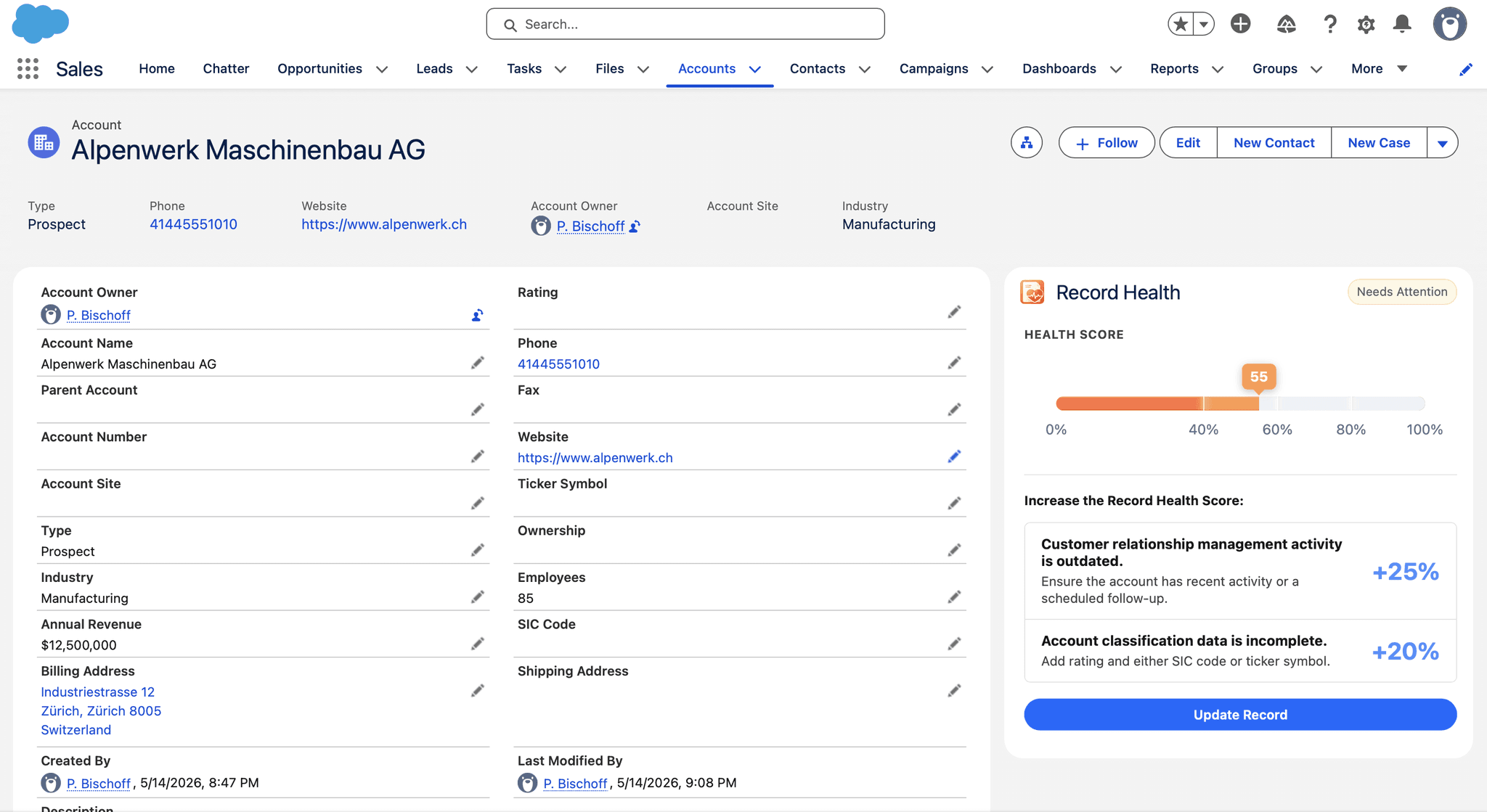
Give your team clear guidance on what needs fixing, right on each record. They can update data during their daily work—without switching tools or waiting for a cleanup project.

DATA HEALTH IN ACTION

Keep records complete, without leaving Salesforce

Give your team clear guidance on what needs fixing, right on each record. They can update data during their daily work—without switching tools or waiting for a cleanup project.

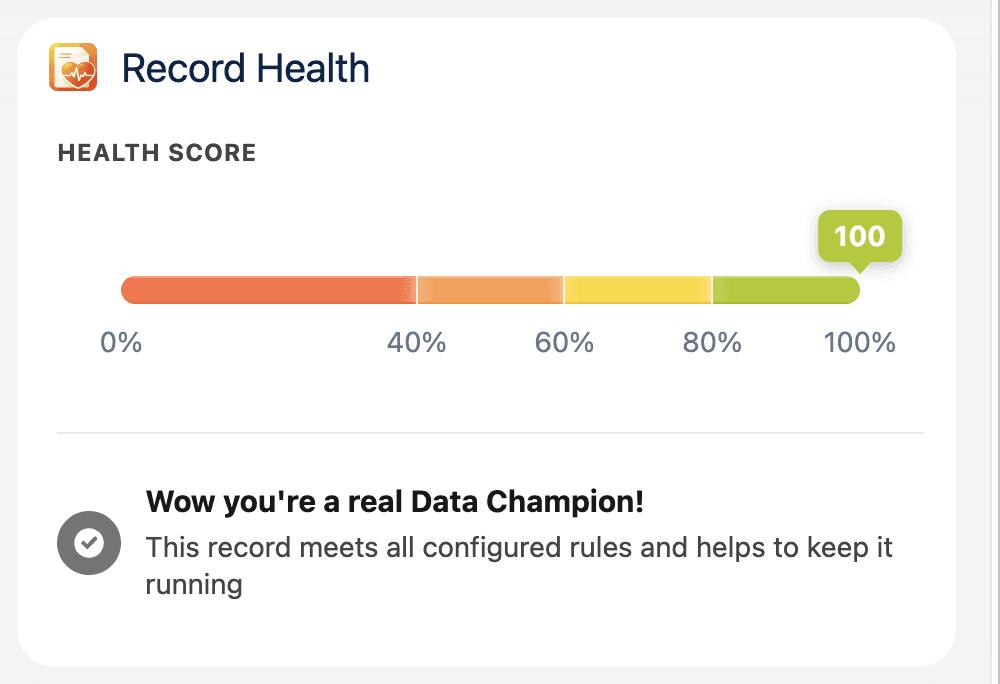
Graph indicating record health with a color scale from red to green, showing current status and improvement suggestions.

Illustrative example

Track data quality

NO MORE UNUSED DASHBOARDS

Spend less time chasing data fixes

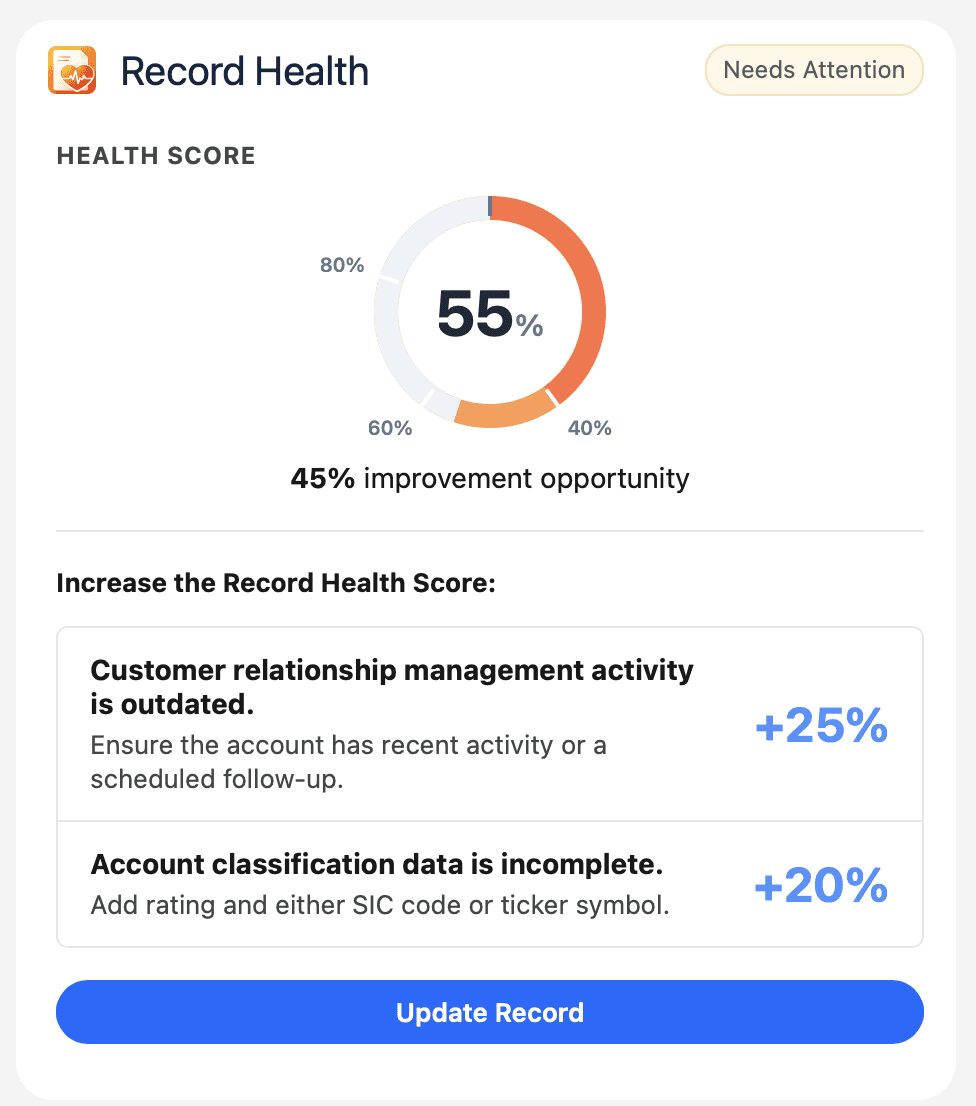
See which records need attention and help your team take the next step. Record-level guidance turns data quality from a reporting task into part of everyday work.

NO MORE UNUSED DASHBOARDS

Spend less time chasing data fixes

See which records need attention and help your team take the next step. Record-level guidance turns data quality from a reporting task into part of everyday work.

FAST ADJUSTMENTS

Set data standards that fit your business

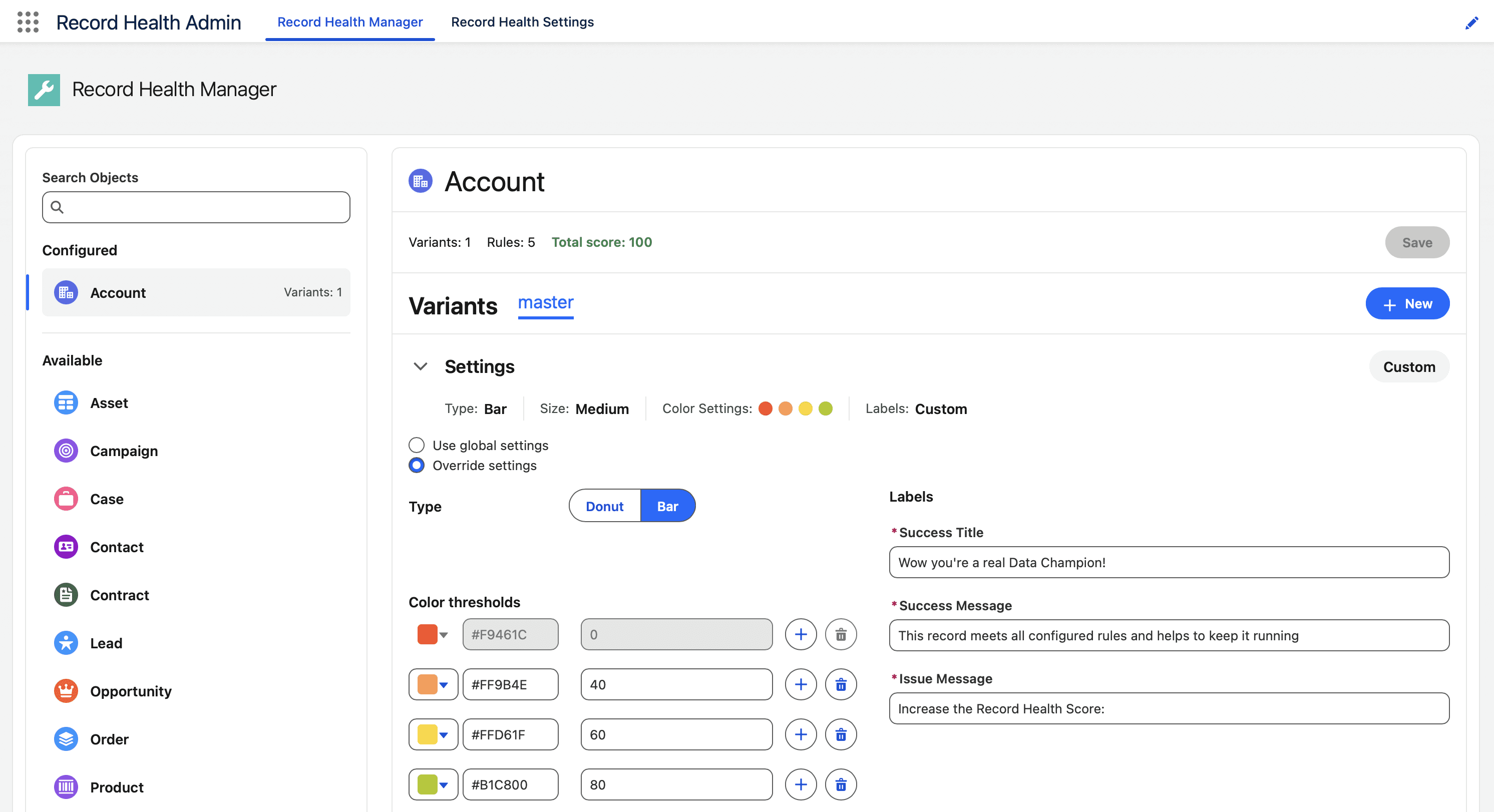
Choose which fields matter, adjust rules and weights, and give colleagues relevant guidance—all without deployments or development work.
Stay ahead with the user in the center

Help your team improve data—not just report on it

Dashboards show the problem. Your team needs a clear next step. Bring guidance into the records they already use, so improving data becomes part of the workflow.

Common approaches

Common approaches

With Daitova

With Daitova

Dashboard-based monitoring

Data health guidance on each record

Dashboard-based monitoring

Data health guidance on each record

Periodic cleanup projects

Ongoing improvements during daily work

Periodic cleanup projects

Ongoing improvements during daily work

Required fields and validation rules

Guidance on what to complete and why

Required fields and validation rules

Guidance on what to complete and why

Bulk updates and merging

Record-level fixes in your workflow

Bulk updates and merging

Record-level fixes in your workflow

Centralized cleanup tasks

Shared responsibility across your team

Centralized cleanup tasks

Shared responsibility across your team

Minimal setup required

In-record guidance

How it works

Improve your data in three simple steps

Install the managed package

Set up Daitova directly inside Salesforce with minimal effort.

Install the managed package

Set up Daitova directly inside Salesforce with minimal effort.

Start with main objects

Define rules, weights, variants, and guidance texts for the records that matter most.

Start with main objects

Define rules, weights, variants, and guidance texts for the records that matter most.

Let your users do the rest

Users receive clear, actionable guidance directly on Salesforce records — making continuous improvement part of everyday work.

Let your users do the rest

Users receive clear, actionable guidance directly on Salesforce records — making continuous improvement part of everyday work.

Choose the right plan for your Salesforce team

Start with a focused rollout or support data quality across your organization. All prices are per Salesforce org, per month.

All prices are per Salesforce org, per month. Scroll sideways to compare all four plans.

All prices are per Salesforce org, per month. Swipe sideways to compare all four plans.

Free

Free

Starter

Starter

Professional

Professional

Professional

Enterprise

Enterprise

Best for

First tests and small teams

Small Salesforce teams

Growing teams and departments

Larger rollouts and data quality programs

Objects

2 standard objects

5 standard objects

Unlimited standard & custom objects

Unlimited standard & custom objects

Rules & Variants

4 rules per object, no variants

6 rules per object, up to 2 variants

Unlimited rules and variants

Unlimited rules and variants

Custom Objects

Included

Included

Translations

Included

Included

Data Quality Cockpit

Basic

Full

Full

User Contribution

Data Champions included

Data Champions included

Advanced Ranking / Services

Advanced ranking, services and personal training

Price

free

€299 org / month

€599 org / month

custom pricing

request a demo

See how Daitova fits your team

In a 45-minute demo, discuss your data-quality challenges, see how record-level guidance works in Salesforce, and explore which setup fits your organization.

We’ll contact you by email to arrange your demo.

15-Minute Salesforce Data Quality Discovery Call

Not sure where to start with Salesforce data quality? Let’s discuss your current challenges and explore whether Daitova is the right fit, in just 15 minutes.

Request by email. We’ll arrange a time with you.

frequently asked questions

Common questions answered

What is Daitova?

Daitova is a Data Health Platform for Salesforce. It helps teams make CRM data quality visible, actionable, and fixable directly on Salesforce records — without switching tools, running manual cleanup projects, or relying only on dashboards.

What is Daitova?

Daitova is a Data Health Platform for Salesforce. It helps teams make CRM data quality visible, actionable, and fixable directly on Salesforce records — without switching tools, running manual cleanup projects, or relying only on dashboards.

How is Daitova different from data quality dashboards?

Dashboards help you monitor data quality problems after they already exist. Daitova helps users fix data quality issues directly in their Salesforce workflow. It shows what is missing, why it matters, and which improvements have the highest impact on each record.

Is Daitova secure?

Yes. Daitova runs inside your Salesforce environment. Your CRM data stays in your Salesforce org and is not transferred to external Daitova servers. This makes Daitova suitable for organizations with strict data governance and security requirements.

Is Daitova secure?

Yes. Daitova runs inside your Salesforce environment. Your CRM data stays in your Salesforce org and is not transferred to external Daitova servers. This makes Daitova suitable for organizations with strict data governance and security requirements.

Does Daitova store scores on my Salesforce records?

No. Daitova does not need to write health scores directly back to your business records. Record Health is evaluated based on your configured rules. For reporting, Daitova can store aggregated evaluation results, such as average score, score distribution, failing rules, and improvement potential.

Can Daitova measure data quality improvement over time?

Yes. With the Data Quality Cockpit, teams can track aggregated Record Health evaluation results over time. This helps Data Quality Managers understand whether data quality is improving, which rules fail most often, and where the biggest improvement potential exists.

Does Daitova work with custom objects?

Yes. Daitova can be configured for standard and custom Salesforce objects, depending on your package. This allows teams to apply Record Health scoring to the objects and processes that matter most to their business.

Does Daitova work with custom objects?

Yes. Daitova can be configured for standard and custom Salesforce objects, depending on your package. This allows teams to apply Record Health scoring to the objects and processes that matter most to their business.

Why not just use required fields or validation rules?

Required fields and validation rules can enforce data entry, but they often interrupt users without explaining the business context. Daitova guides users instead. It explains what is missing, why it matters, and how much each improvement contributes to the record’s health score.

Who is Daitova for?

Daitova is built for Salesforce teams that depend on reliable CRM data — including Sales Ops, RevOps, Data Quality Managers, Salesforce Admins, and business teams working with Accounts, Contacts, Leads, Opportunities, Cases, or custom objects.

Who is Daitova for?

Daitova is built for Salesforce teams that depend on reliable CRM data — including Sales Ops, RevOps, Data Quality Managers, Salesforce Admins, and business teams working with Accounts, Contacts, Leads, Opportunities, Cases, or custom objects.

Does Daitova require user training?

Daitova is designed to be easy to understand for everyday Salesforce users. The Record Health component uses clear scores, business-friendly messages, and guided improvements, so teams can act without learning a separate tool.

Does Daitova require user training?

Daitova is designed to be easy to understand for everyday Salesforce users. The Record Health component uses clear scores, business-friendly messages, and guided improvements, so teams can act without learning a separate tool.

Is there a free plan available?

Yes. Daitova offers a free plan for teams that want to start improving Salesforce data quality with simple Record Health scoring. It is a low-risk way to test the approach before scaling to more objects, rules, and reporting features.

Is there a free plan available?

Yes. Daitova offers a free plan for teams that want to start improving Salesforce data quality with simple Record Health scoring. It is a low-risk way to test the approach before scaling to more objects, rules, and reporting features.

© 2026 Daitova GmbH · Privacy Policy · Legal Notice · info@daitova.com

© 2026 Daitova GmbH · Privacy Policy · Legal Notice · info@daitova.com